Facebook Launches Instant Articles by metrotopic
Showing posts with label Facebook. Show all posts
Showing posts with label Facebook. Show all posts

Facebook will be news platform starting this month
Thursday, 7 May 2015
 According to a Wall Street Journal report, Facebook users might soon start seeing Facebook hosted news content from major publishers directly in the news feed. The social network is reportedly in talks with publishers including Buzzfeed, the New York Times, National Geographic and several others to host their content on a new Facebook feature called Instant Articles. Instant Articles will bring complete news, articles and videos to a user’s news feed.Many publishers generally post links on to the network which has become an important source of online traffic for them. Accessing that content is generally a slow process that Facebook wants to improve with this feature. Instant Articles will bring a new feature to the social network that will allow news articles to be hosted on Facebook’s platform. This should, in turn, allow decreased loading times and increased engagement for articles that users view using the social network’s mobile platform.
The new feature is said to begin start rolling out this month.
Facebook users are soon going to experience Facebook hosted news content from major publishers directly in the news feed
Content publishers are cautious about having their content hosted by Facebook directly, but Facebook has reportedly been trying to negotiate a positive response from them.
“It’s not just about the bottom line,” said an executive of one publisher that has had discussions with Facebook. “Publishers will still want to defend other aspects of the business”. The social network is promising some publishers, up to 100 percent of their ad revenue from the articles. The report adds that content publishers do not need to pay the social network for hosting their content and is offering the publishers to keep all the revenue earned from ad sales on the hosted pages.
Select publishers who are partnering with Facebook for the project are promised 100% ad revenue
Under the offered revenue scheme, publishers will keep all of the revenue they generate from their ads while the social network will hold on to about 30 percent of the revenue generated through ads from articles that Facebook sells. Facebook is ready to give up some of the revenue so that it can motivate users to spend more time on the social network. Though, this will indirectly increase Facebook’s revenues as it increases its user engagement numbers who would normally head to an external link.
The list of launch partners is yet to be finalised but if deals do not materialise, Instant Articles could see its release date pushed back by a few weeks. The details regarding publisher’s control over their own content and the format of ads that will be employed in Instant Articles is still under question. The report mentions that the information comes from people close to the matter and that “they (Facebook) want to retain control over the user experience, as well as access to data on their readers”.
Facebook Testing New Name Pronunciation Advice
Sunday, 19 April 2015
Facebook is experimenting with a new feature that lets you tell the world how to pronounce your name.
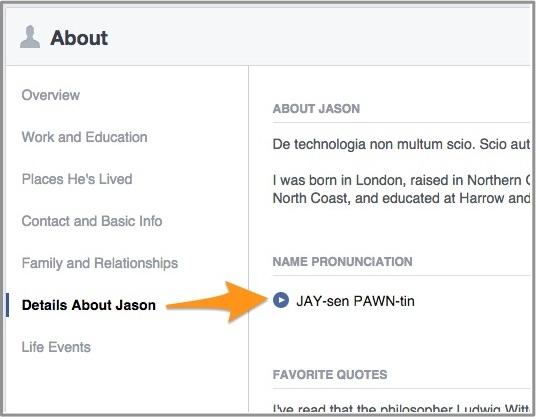
(Image: Yahoo Tech)
In a small number of profiles so far, Facebook is showing how the user’s name is pronounced. It will also play an audio clip of the name. We’ve only seen one profile so far with this feature: MIT Technology Review publisher and editor in chief Jason Pontin’s.
When asked, Facebook had this to say about the profile addition: “We’ve begun a small test of a feature that lets you indicate how your name is pronounced. The pronunciation will be displayed on your Profile along with an option for people to click to hear an audio playback. For now, we’re focusing this test on English speakers in the U.S.”
If you want to check whether you’ve got the new feature, Facebook says to go to Facebook on your computer’s Web browser, visit your Profile, and select the About tab. From there, you can click “Details About You” and then “How do you say your name?” Here, you can preview and select from Facebook’s guesses about the pronunciation, or write your own.
Pontin says that while editing his profile, he saw “three options, all wrong.” Then, he said, “They offered the opportunity to suggest something better. Then, ignored it.” (Since this story originally ran, Facebook has reached out to me to say they have improved the suggestion process.)
And that’s why features like this are tested in small batches before they are rolled out to the world.
Facebook provided these images of the feature for a name that — at least for me — might need more pronunciation guidance than Mr. Pontin’s:
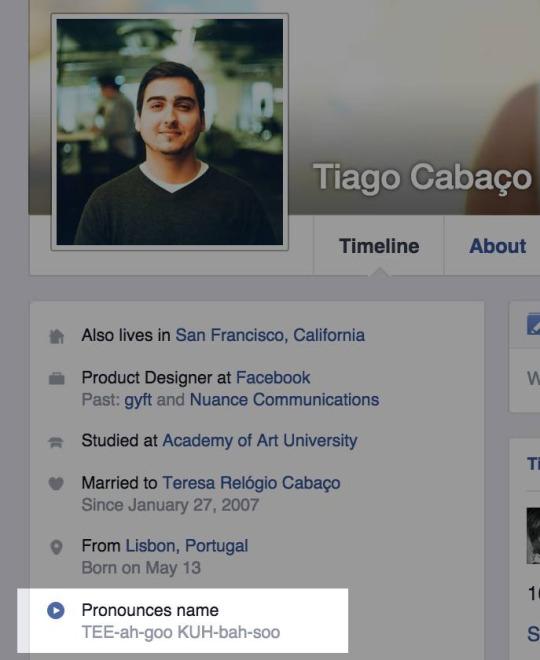
Well, that helps. (Image: Facebook)
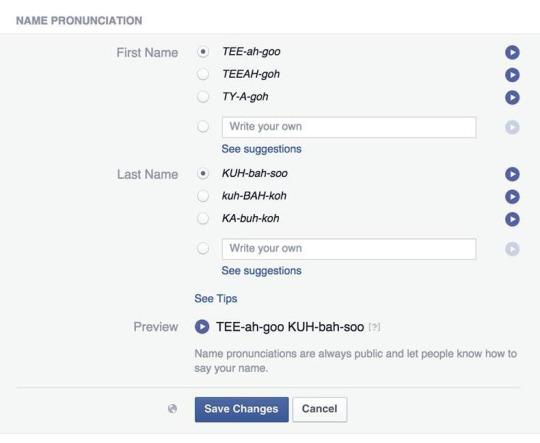
Giving Facebook guidance. (Image: Facebook)
Facebook Now Lets You Choose Who Controls Your Account After You Die
Thursday, 12 February 2015
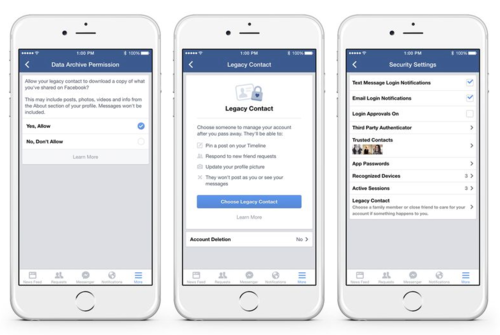
Facebook is putting its users in control of what happens to their accounts after they die. Starting today, users in the US will be able to chose to have their accounts deleted after death or grant another person on Facebook permission to manage an account on their behalf. Facebook calls this person an account’s “legacy contact,” and users will be able to choose that person through the website’s or app’s security page.
If you chose to set up a legacy contact, that person will be able to change your profile photo, accept friend requests, and pin announcements on your account’s timeline after Facebook receives notice of your death. A legacy contact won’t be able to post as the account that they’re controlling, nor will they be able to view that person’s private messages. Facebook will also provide an option to let legacy contacts download a file containing an account’s photos, posts, and other information.
Before today, Facebook provided a process to freeze accounts after death, but there was no way to set them up to be managed by someone else or automatically deleted. Facebook said last year that it was working on better ways to handle accounts after death — at the time, it started respecting users’ existing privacy settings and allowing “Look Back” compilation videos to be generated. Now, about a year later, it’s actually giving its users control. Setting up legacy choices is optional, and Facebook says that they’ll eventually roll out to other countries.
Facebook launches ThreatExchange platform to keep Internet safer
Wednesday, 11 February 2015

Facebook on Wednesday launched a new platform to help thwart fast-evolving malware and other online threats.
The new platform, ThreatExchange, allows people to share information and solutions to better address online attacks, Facebook's Mark Hammell said.
"We quickly learned that sharing with one another was key to beating the botnet because parts of it were hosted on our respective services and none of us had the complete picture. During our discussions, it became clear that what we needed was a better model for threat sharing," Hammell, manager of Facebook's threat infrastructure team, said in a blog post.
He said ThreatExchange is an API-based platform for security threat information – just in line with Facebook's core service is a platform for sharing.
Also, he pointed out this would jibe with ThreatData, Facebook's existing threat analysis framework.
The platform also allows flexibility for organizations to be more open or selective about the information they share, he said.
"As a result, we included a set of privacy controls so that participants can share only with the group or groups they wish," he said.
With ThreatExchange, Hammell said partner companies can query the available threat information and also publish to all or some participating organizations.
"Threat data is typically freely available information like domain names and malware samples, but for situations where a company might only want to share certain indicators with companies known to be experiencing the same issues, built-in controls make limited sharing easy and help avoid errors by using a pre-defined set of data fields," he said.
Hammell indicated early partners in this effort include Pinterest, Tumblr, Twitter, and Yahoo. Upcoming new contributors include Bitly and Dropbox, he said.
ThreatExchange can be accessed at (threatexchange.fb.com).
"To be stronger together, we need a more open approach to security with the right tools. That’s how we can most effectively protect people’s accounts, safeguard data, and rid our services of spam and malware," it said.
Hammell said the goal is that organizations anywhere will be able to use ThreatExchange to:
- share threat information more easily
- learn from each other's discoveries
- make their own systems safer.
- learn from each other's discoveries
- make their own systems safer.
"That's the beauty of working together on security. When one company gets stronger, so do the rest of us," he said. — Joel Locsin/LBG, GMA News
Free Internet: Facebook gives free internet to Indians – coming to Pakistan soon
Tuesday, 10 February 2015
Facebook has been working on a mega philanthropic project calledinternet.org.
This is the project where Facebook provides free internet to the citizens. However, free does not mean that users can open absolutely any website whatsoever. Internet.org project only provides a selection of websites, including Wikipedia, BBC, AccuWeather and… Facebook. If the user wants to visit any other website, the user has to pay.
The idea behind this project is that the future of the world is ‘knowledge-based economy’ so internet becomes the key resource for any nation to progress.
Internet.org services had been launched in developing countries of Latin America and Africa. But now, they seem to be targetting emerging markets as well because internet.org’s free internet service has just been launched India.

The project is being implemented with the help of Indian telecom giant Reliance.
At the moment, only six Indian states, namely Tamil Nadu, Mahararashtra, Andhra Pradesh, Gujarat, Kerala, and Telangana, will be able to use this free internet but Facebook intends to roll out the internet for the whole of the country in the upcoming months.
The free internet can be acquired by using internet.org’s free Android app.

What About Pakistan?
We all know Mark Zuckerberg and Pakistan never got off to a good start, then that Hamza Ali Abbasi incident furthered the gap.
Yet, the billionaire entrepreneur plans to come to Pakistan as well.
Yet, the billionaire entrepreneur plans to come to Pakistan as well.
When announced that they have rolled out free internet for Indians via a Facebook status update, a web developer from Lahore – Imran Javed – immediately asked what were his plans about coming to Pakistan. Mark replied:

Pakistan has nearly 30 million facebook users, which is an enormous market. Mark Zuckerberg does realize that if they leave Pakistan and cover only India, Pakistanis will find Facebook’s move offensive.
So we can conclude that media internet.org will soon roll out its plan for Pakistan soon. Now all we need is that when Facebook authorities our government, they should respond vigilantly and positively.
Change Your Life: 11 Ways Facebook Has Changed Your Lives!
Friday, 6 February 2015

Happy Birthday, Facebook! As of today, we have spent 11 years of our lives on Facebook, scrolling down the News Feed, liking and commenting on friends & family pictures, sharing our life happenings and much more on the most addictive social media – Facebook.
Mark Zuckerberg made Facebook Birthday all about celebrating friendships saying,
“Today is a day to celebrate friends. It’s also Facebook’s birthday, but today isn’t about celebrating us. It’s about friendship.”
He added that friendship is not a distraction rather it gives meaning to our lives since we laugh, we cry, we learn, we eat, we shop, we work with friends; in most cases, we spend more time with our friends than anyone else. While we agree with Mark on his theory about friendship, we cannot neglect the fact that Facebook has indeed changed our lives. Now, it is for you to decide whether this change is for better or for worse.
Following are the 11 ways we think Facebook has changed our lives.
1. Facebook has become the primary source of receiving news, be it national, international or personal.
2. We have lost the value of time.
3. Nowadays people look more vibrant on Facebook but they have nothing going on in their actual life.
4. If your birthday is not on Facebook, no one remembers your birthday or even care about you.
5. Stalking has become an acceptable social activity.
6. Manners have gone to the trash, you can say anyone anything without feeling guilty about it.

7. In some cases, maintaining a social life has been limited to maintaining a Facebook life.
8. You are displaying your personality openly with every like, comment and share. It has just become easy for people to manipulate you.
9. Facebook Addiction Disorder (FAD) was coined by an American Psychologist. It is defined by hours spent on Facebook such that the healthy balance of the individual’s life is affected. The symptoms include
- They always try to gain emotional satisfaction on Facebook.
- They withdraw from recreational activities if restricted to use Facebook.
- They replace real dates with virtual dates.
- Last stage: Their life becomes Facebook as in everything they do involves Facebook.
10. It has become easier to show grief, to have sympathy and to help those in need. The trick is to change your profile picture, cover photo and status. Moreover, you can give one or two thumbs up and complain through your comments.
11. Every emotion expressed on Facebook seems 10 times more emotional than it is in reality.
Do you agree with these 11 ways Facebook has changed your lives? Let us know if we have skipped any Facebook-induced change in the comment section below.
Facebook Launches a ‘Lite’ Version for Low End Android Devices
Monday, 26 January 2015

Facebook has quietly launched ‘Facebook Lite’ in emerging markets for lower end Android smartphone users. It was released over the weekend but hasn’t been officially marketed on any of the company’s channels.
At the moment, it’s available for download in Bangladesh, Nepal, Nigeria, South Africa, Sudan, Sri Lanka, Vietnam and Zimbabwe. If you want to use it in Pakistan, head to the bottom of the post to download the APK.
The app, which is only 252 KB is size, is specifically built for low end and old Android devices and anyone using a poor quality internet connection. It’s clearly taken a leaf out of Snaptu, the Facebook app for feature phones, but it has all the usual bells and whistles associated with Android apps like push notifications and camera integration.
The move seems like a clever one. Smartphone usage is exploding in developing countries but the bulk of the sales are for cheaper Android smartphones. The current Facebook app is terrible in terms of consumed resources so a Lite version is going to be music to the ears of many.
Right now, the app has between 10,000 and 50,000 installs and 4.6 rating so initial response has been very positive.
Download Facebook Lite APK from here.


How To Delete Unread Facebook Messages On Mobile And Web
Thursday, 22 January 2015
Here’s how you can delete unread messages on Facebook without opening them up on the Web or mobile phone. Head on after the jump for the complete guide.
Read receipts on Facebook can be pretty annoying for those who normally find themselves avoiding social calls. The excerpts can sometimes help get the message across, and if you’re sure you understood the incoming message but don’t want the contact to know that you’ve read it, you don’t want to keep it hanging around in your inbox, risking the chance of opening it up by accident.

Deleting Unread Facebook Messages On The Web
Not that this has to be told, but there are users that always surprise us. Receiving a new message usually shows a red badge with the Messages icon in the ribbon at the top.
Step 1: Click the Messages icon, and you will see a pop-up menu appear listing your most recent Facebook conversations, including the unread messages highlighted in a light shade of blue.

Step 2: At the foot of these listings, you should see the ‘See All’ action button. Click that.

Step 3: You should now be seeing an expanded inbox view of your Facebook messages, but don’t worry; it will not automatically open your most recent unread message. Simply hover the mouse over that unread message and should you see the ‘x’ (Archive) button, so click it.

Currently the only way to actually delete a Facebook message is to delete it after the message is opened, so archiving is the only safe option to clean up your inbox without triggering the readreceipts.
Deleting Unread Facebook Messages On Mobile
The steps listed here are typically meant for the Facebook Messenger app and not the mobile Web version. Deleting unread messages from the app is pretty straightforward.
Step 1: Run the app and you will see a list of all your messages, where the unread messages will be listed in bold text.
Step 2: To delete the message, simply swipe left on that message and you should see a couple of options such as More, Mute, and Delete. Tap the red-colored Delete button. On Android, simply tap and hold on the message for a few seconds to bring up the action menu.

Step 3: Doing so, the app will ask you if you intend on deleting the message or archiving it. Both the options here will clear your inbox of those unwanted unread messages, with the latter saving it to the Archives folder.

WhatsApp vs Facebook Messenger: Which is the Best Messenger App for You
Wednesday, 21 January 2015
Whether you love Facebook Messenger and WhatsApp or hate them both, the two instant messengers are now inextricably linked to the tune of more money than it costs to buy the US porn industry, the Large Hadron Collider, the entire NBA or even the world music industry. But if you're tossing up about making the switch, using both, or perhaps even neither, find out all of the pros and cons of both services in our WhatsApp vs Facebook Messenger comparison.

Facebook Messenger – what's good?
Facebook Messenger has a clean, light blue interface. The app will inform you when your contacts are online, either on Messenger or Facebook, and it allows you to chat with individuals and groups.
You can text non-Messenger friends using their phone number, send media including pictures, stickers and voice messages, continue chatting while in other apps via the use of Chat Heads, and share location information with your friends. Messenger also allows you to make free calls internationally to other friends using the service.
Facebook Messenger – what's bad?
For starters, you can't log out within the app itself: there is no log out button. To get out, you need to go to Settings > Applications > Manage Applications. Open 'Messenger' and 'Clear Data'.
There's also a lot of bugs still complicating things, like internet connections that just won't connect (and thus make the app entirely useless as an instant messenger). You also can't fully disable notifications either. And being spammed to get your friends to join the service all the time is very annoying.


WhatsApp – what's good?
WhatsApp is probably the most well-run instant messaging service available, handling more instant messages in a day than the entire global SMS industry. We've dedicated many hours of our time toWhatsApp tips and tutorials.
WhatsApp uses your telephone number (and that of your friends) to set up an account so new contacts are added as soon as you get their phone number, assuming they use WhatsApp. Unlike Facebook though, it is not linked to a larger service.
WhatsApp allows you to send free instant messages to anyone you know with the app installed and you can chat with individuals or groups. You can send videos, pictures, voice messages and location data, and it also features some easy-to-use sharing features and has a huge array of emoticons to spice up your messages.
WhatsApp – what's bad?
WhatsApp, while providing a good core service, is kind of light on extras. There's no voice calling (yet), moving stickers or mini games. As with Messenger, there is no option for video calling either. You can't log out of WhatsApp either because it uses your phone number, so you will always receive messages (but you don't appear as ''online'' until you enter the app).


| Messenger | ||
| Free | Yes | No (99 cents annual subscription fee) |
| Free calling | Yes | No |
| Account requirements | Facebook account | Telephone number |
| Time stamps and read confirmations | Yes | Yes |
| Automatic backup of messages | Via Facebook website | Every day at 4 PM |
| Security reputation | Not great | Recently improved (messages are encrypted) |
| Send pictures | Yes | Yes |
| Send videos | No | Yes |
| Send stickers | Yes | No |
| Send voice messages | Yes | Yes |
| Search function | Yes | Yes |
| Send location data | Yes | Yes |
| Option to log out | No | No |
| Video calling | No | No |
| Set wallpapers | No | Yes |
| Customize notifications | Only on or off | Yes |
Conclusion
Facebook's Messenger app still needs a lot of work whereas WhatsApp is pretty perfect in its simplicity. Messenger offers some additional features like free voice calling that WhatsApp doesn't have yet, but WhatsApp allows for more file sharing options and customization. Messenger is a small part of a much larger social network and WhatsApp's basic messaging service has no frills. There are actually more differences than similarities.
Facebook Messenger can be checked on the web but WhatsApp cannot, and this is quite significant. When I want to change from swiping and have a more fluid conversation using a physical keyboard I have to switch to Facebook. WhatsApp has a very good reputation for delivering messages whereas Messenger isn't quite as reliable.

Neither of these instant messengers are perfect, and both have spotty security histories. But both have a huge following and that is their strength – chances are that all of your friends are using either one or both of these services. While there are other, better-featured messenger appsavailable they simply do not have the same reach.
It seems unlikely to me that Facebook will mess with WhatsApp too much, but monetizing that service further will surely come in time (at the moment neither service has ads). The decision really comes down to whether you want a service tied to your social network or to those friends whose phone numbers you have – or both. Or you can go AWOL entirely and check out our list of the best WhatsApp alternatives and encourage your friends to start using one of those instead.
Do you use either or both of these services? Has Facebook's purchase of WhatsApp made you consider alternatives?
Source:AndroidPit
Facebook Messenger Will Now Transcribe Your Audio Messages
Saturday, 17 January 2015
Users of Facebook Messenger will now see text previews of voice messages, assuming their account has had a magic switch flicked.
Even in 2015 and with so many excellent ways of communicating available to us, the humble voicemail just won’t die. Originally created as a way for people to leave voice-based messages for people who are not reachable for whatever reason, voicemails have now started to creep into instant messaging apps on every platform. Even Apple’s iMessage now allows short voice messages to be sent and received.

The problem is that while sometimes sending a voice message is more convenient than having to type it out, listening to it is usually less convenient for the recipient. For that reason, any sort of transcription element is always welcome, and that’s exactly what the popular Google Voice has been trying to get right for years. Fancy voicemail solutions such as Libon have also tried their hand at transcribing voice messages, but so far few have managed to get it quite right.
That isn’t about to stop Facebook from giving it a try though, with David Marcus, the man behind Messenger, announcing that the app will allow some people to receive text transcriptions of in-app voice messages, giving them a preview of what the audio message says.

Writing in a Facebook blog post, Marcus says that the plan is to roll the new preview feature out to at a ‘tiny scale’ while the company gets to grips with things, and given the fact that voice message transcription is extremely hard to do right, we can’t blame anyone for not wanting to flick the switch for all of Facebook’s users just yet.
Facebook’s testing has already begun and those who’s accounts have been activated should see text previews start to appear for both sent and received voice messages soon enough.
Subscribe to:
Posts (Atom)