Are you one of those who have been waiting for the new Windows OS? Few hours ago one PC manufacturer made headlines by revealing Windows 10 release date and new Windows will be out in the late July this year.
Microsoft has also announced a free download for Windows 7 and Windows 8 users for 12 months.
AMD, which is also Microsoft software partner revealed to analysts and investors on a conference call that this new OS for which Microsoft and PC manufacturers are waiting will arrive at the end of July. We might see a bit of a delay for the launch of Windows 10, said Lisa Su the CEO of AMD.
The users are surprised at this delay as Microsoft already gave a summer release date for the OS and Lisa Su didn’t make it clear whether the date was for PC manufacturers or the general public. So, now Windows 10 release date has confirmed and Microsoft has also announced free download for users who have purchased Windows 8 and 7, this free download will be only for one year.
Microsoft has been releasing and launching Windows 10 based app and gadgets ever since it has announced Windows 10, like few days ago Surface 3 was launched and a preview of map apps for smartphones was also revealed by Microsoft.
Few other changes have been made in Windows 10 such as Spartan browser has replaced internet explorer and Cortana voice assistant has announced for Windows 10 based smartphones.
A video of the Xiaomi Mi 4 smartphone running Windows 10 for phones has just been posted online, showing Microsoft’s OS running on a device that ships with Android out of the box. What is this wizardry? Head over the jump to find out more about this development and watch a video of the OS in action on the phone.
A few weeks back, Microsoft announced that as a part of its Windows Insider Program, it was stepping up its game concerning Windows 10 for phones by working with Xiaomi to provide power users a chance to experience Microsoft’s latest mobile OS on their device.
And now, a video has surfaced showing the entire thing in action. The three minute long video is entirely in Mandarin, so unless you speak the language, you’ll just have to focus on the visuals at hand. The OS does look surprisingly smooth given how the phone wasn’t really built for running Windows 10. Microsoft’s idea was to achieve this by throwing in a custom ROM to Mi 4 users who would be able to flash it onto their phones, which is exactly why it was intended for ‘power users’. Essentially, this replaced the existing Android OS on the device with a Windows 10 based ROM, giving users a native experience.
Given that this is the first instance of such an initiative seen on an Android device, and we can see how smooth the overall functionality is, the road ahead is looking pretty good for Microsoft’s latest mobile OS. We already know that the software giant has planned to make Windows 10 free for all smartphone and tablet sized devices, and by making such custom ROMs available to Android users, it looks to have figured out a way to penetrate a market that is dominated by Google’s mobile OS and Apple’s iOS.
Microsoft had already said during the announcement of this initiative that it would be looking to expand the program to more Android devices in the future as the responses from Xiaomi users come in.
It seems as if modification is not limited to iPhones alone. A slew of recent reports indicate that XDA developers have developed a process that allow all Windows 8 phones to upgrade to a preview version of the upcoming Windows 10 platform. Previously this update was available to only a limited number of Lumia devices.
What the process does, essentially, is to trick the app into thinking the phone is the Lumia 635 – which is a supported device available for the preview. Hence users are allowed to download and install the Windows 10 Technical Preview for Phones.
The process tricks the Windows Insider app into thinking your phone is the Lumia 635, a supported device for the Windows 10 Preview
At the start of the process, users are required to change the phone’s ID, however once the process is complete, further minor updates through the ‘phone update’ setting are no longer accessible. The entire thread detailing this complicated process is 14 pages long, so therefore is definitely time-consuming and cumbersome.
On the forum people have reported successful upgrades of their HTC 8X and One M8 for Windows, as well as some Huawei variants of Windows Phone. The Lumia 930, 925 and 920 ‘flagship’ devices also support this modification process.
Please be careful if you decide to follow the guide, it’s a complicated process and a LOT can go wrong
Like all illegal modifications, this is likely to result in your warranty being declared null and void in case something goes awry. However, if you have a Windows device that isn’t your primary phone, then it could be a fun experiment to test the new platform that Microsoft has been working on. It is likely that official upgrades to Windows 10 will follow in the near future to many more devices, so a little patience could also go a long way.
Microsoft’s Windows 10 Technical Preview may seem to be a good alternative for current Windows users, But in reality it aint so!!!
Microsoft seems to have decided not to release next major build of its Windows 10 desktop preview version next week but instead offering an update for the current Windows 10 Technical Preview 9926 version. It seems that Microsoft is running slow of it schedules or what tech world has expected of it.
Not to forget that Microsoft’s final Windows 10 build won’t be available to all users commercially, until this fall. Looking at the bleak scenario, users looking for Windows 10 final build are trying out the Windows 10 Technical Preview for free, but is it really a wise to do so?
Here are 5 top reasons why I think installing Microsoft’s Windows 10 Technical Preview is not a wise decision!
1. Windows 10 Technical Preview not the best Microsoft is going to give you in terms of software
Like all major companies, Microsoft’s Windows 10 Technical Preview has been released to test the major things it lacks. Also it is a beta version for vulnerabilities, bugs and flaws that should be fixed before the Windows 10 commercial release. What that means is, Microsoft needs as many users as possible to test Windows 10 Preview on their PC’s to help it check how it can improve the Windows 10.
Since you have chosen to test out the Windows 10 TP, you should be knowing that your PC will become more prone to bugs, vulnerabilities and crashes. Some users are even reporting BSODs. What that means is your ‘Familiar PC’ may become very unfamiliar to you with very new and unexpected problems starting to kick in, which could be anything starting from PC getting slow to overheating, to a total performance downgrade.
3. Software Issues / Incompatibility
One of the major reason why you should not opt for the Windows 10 TP version is that you may face various software incompatibility issue.
Think about it, you try to access a software and it goes dead with your freshly downloaded Windows 10 TP version. As said above, Windows 10 TP is a guinea pig of sorts and it may be some time before Microsoft’s engineers put all the drivers and software components for all Apps and accessories. Knowing that you are just a part of the great Microsoft Windows 10 TP lab program, it could a very bad idea, especially, if you run variety of softwares on your PC, Even Microsoft warns you of that,
“Unexpected PC crashes could damage or even delete your files, so you should back up everything. Some printers and other hardware might not work, and some software might not install or work correctly, including antivirus or security programs. You might also have trouble connecting to home or corporate networks.”
4. If you are a privacy advocate, you should be knowing that your Windows 10 TP version use will be closely monitored by Microsoft.
Well, a technical preview version is always made to do so, monitoring every system it is on to gather useful information on how to improve itself. but there are side effects of it too. With new revelation coming every day on how tech companies are monitoring you and sharing those data with law agencies or ad networks, it may not be a wise decision to go for Windows 10 TP. For more information visit preview privacy statement from Microsoft which states,
“When you acquire, install and use the Programme software and services, Microsoft collects information about your use of the software and services as well as about the devices and networks on which they operate. Examples of data we may collect include your name, email address, preferences and interests; location, browsing, search and file history; phone call and SMS data; device configuration and sensor data; voice, text and writing input; and application usage.”
5. Reverting back is as usual, slow and boring process of reinstalling your old version of Windows
Incase you get dissatisfied by the Windows 10 TP version and is thinking of rolling back to your old version of Windows you will have to go through the process of reinstalling, recovery disc or USB recovery drive.
While these are only very few reasons why choosing the Windows 10 TP version is not a wise decision you should also keep it in mind that Microsoft is not giving all the features which it announced will be coming with Windows 10 and for that you will have to wait for the final version.
The user experience or System performance will be different from a user to another depending upon his hardware and software/ driver uses. so if it performs well for your friend, it does not mean that you will get the same experience using it on your PC.
The Windows 10 technical preview for phones doesn’t walk up, slap you in the face, and demand your attention, as Windows Phone 8 and its Live Tiles did. But you can detect a subtle power, even at this early stage—and one very nice feature: deeply integrated speech recognition.
Right now, I’d characterize Windows 10 for phones as a convenience. That’s not a criticism. Features like interactive notifications or the improved Quick Actions may be nothing new for iOS and Android phones. But who cares? They’re useful nevertheless.
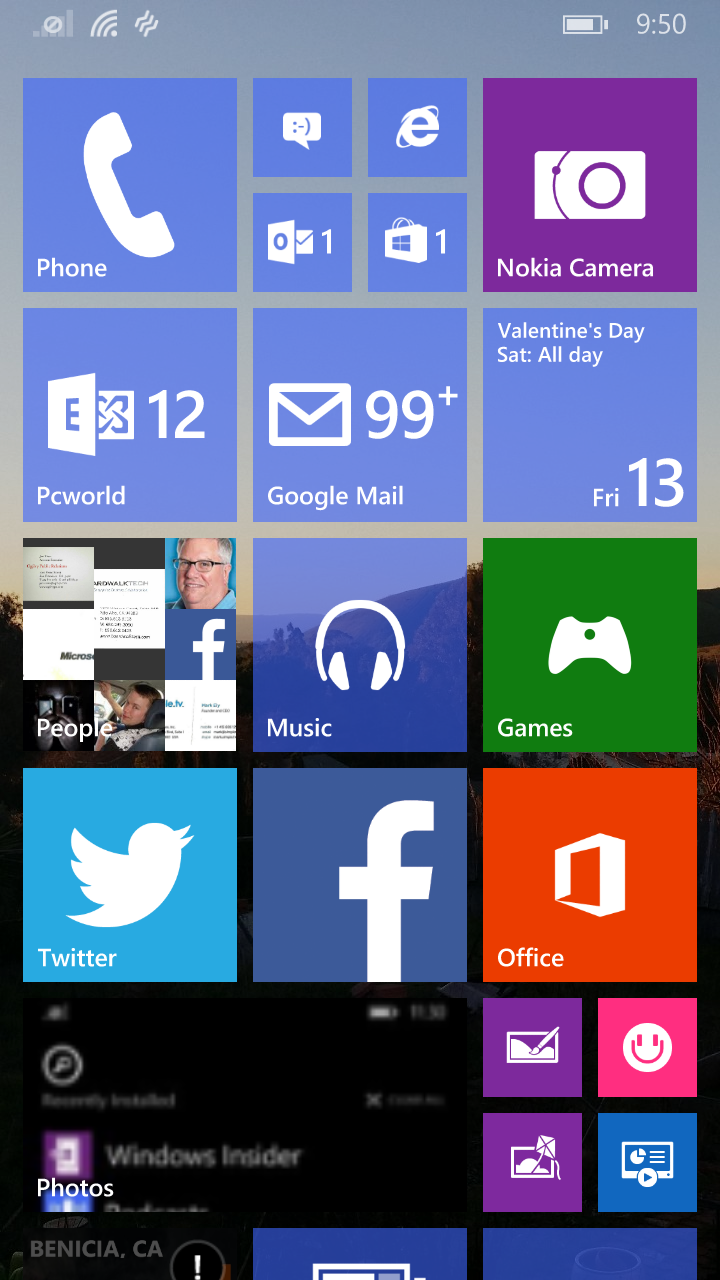
Aesthetically, there are few changes between Windows Phone 8.1 and Windows 10 for phones.
Windows 10 for phones is also not for everyone—yet. I have four Windows Phones within reach, at least two more at the office, and one in my wife’s hands. None were approved to download Windows 10, and thus I had to ask Microsoft to loan me back the Lumia 830 we reviewed last year.
After evaluating it overnight, I’d say this: If you own a single Windows Phone and are considering taking the plunge into what is essentially alpha software, I’d hold off for a bit. I'm assuming your phone is a lifeline for your business and personal lives. There are bugs, though nothing I did crashed the phone. On the other hand, if you have a spare that Microsoft has approved to receive the updates—sure, why not?
My Lumia 830 had a fresh installation of Windows Phone 8.1 on board. Installing Windows 10 for Phones required over an hour, both to re-download applications I had cloned over from a separate installation and to install the new software. (As ourprevious story noted, you’ll need to be a member of the Windows Insider program, download the related app, and approve the download. You’ll also have a choice between a “fast” upgrade path, risking more bugs for more frequent upgrades, or a “slow,” more conservative approach. A separate recovery tool app allows you to back out and restore Windows Phone 8.1 if you so choose.)
IMAGE: MARK HACHMAN
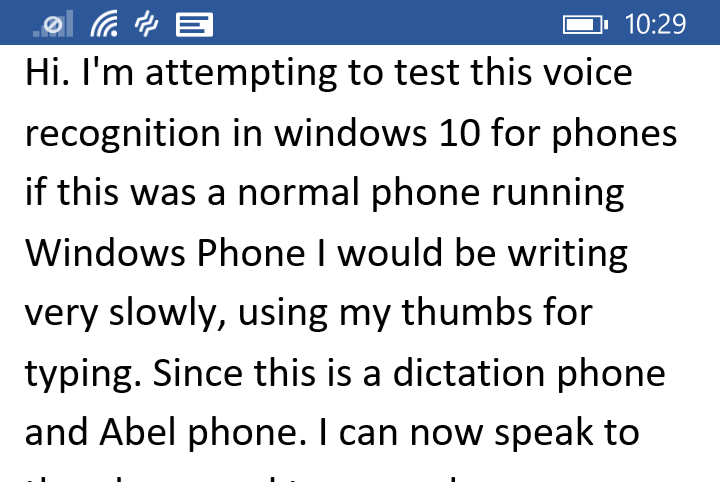
This is me speaking. (“And Abel phone” is me saying “enabled phone.”)
In general, Windows 10 for phones felt a mite clunky in places, especially with animations, but otherwise ran smoothly.
Speech recognition changes everything
The improvements that Microsoft added in this version of Windows 10 fall into two categories: functionality and aesthetics. And the integrated speech recognition is the best of the bunch.
Microsoft says that speech will basically be an option in most if not all text fields, allowing you to dictate what you’d normally type. I personally use digital assistants like Cortana and Google Now quite routinely, and feel comfortable quietly setting a reminder or asking a question with my phone held close to my mouth.
The one thing Windows Phones don’t really do, however, is allow you to dictate text. (Yes, you can talk to Cortana, Microsoft’s digital assistant, and even dictate SMS text messages. But that’s about it; you can’t dictate an email at this point.) If you want to take a note in OneNote, you must type it, or else record an audio snippet to be transcribed later. Windows 10’s voice dictation works well, and adds another layer of productivity to Microsoft’s message.
MARK HACHMAN
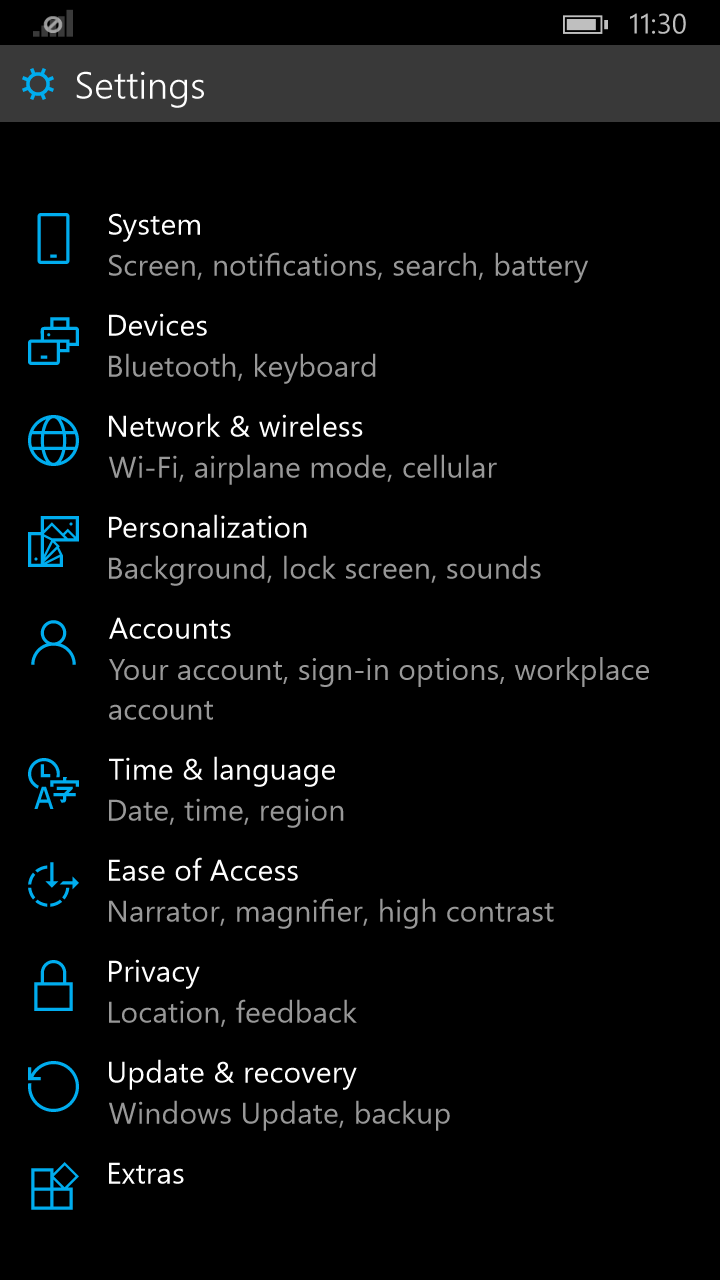
In Windows 10's phone preview, the Settings menu is less jumbled.
Google has offered speech input for some time, although it may be a feature you have to enable on your Android phone. But while Google’s speech recognition requires you to dictate the word “period” to end a sentence, Microsoft intuits it from your voice and sentence structure. It’s not perfect, but Windows 10 generally gets it right. Interestingly, it’s also somewhat speaker-independent. My wife was able to use my phone to “type” a sentence with her voice, too. If this proves to be the case, letting Windows 10 phones transcribe a college lecture into OneNote would be a useful tool.
A redesigned Settings menu, an improved Action Center, and toast messages
The current Windows Phone 8.1 Settings menu feels like a junk drawer of odds and ends. I have a vague feel for where current settings live, and how quickly I need to swipe down to find them. But a lack of alphabetical (or any) order, really, is confusing.
Windows 10 solves that problem by organizing the Settings menu into a few neat subcategories, making it much easier and more intuitive to find what you’re looking for.
MARK HACHMAN
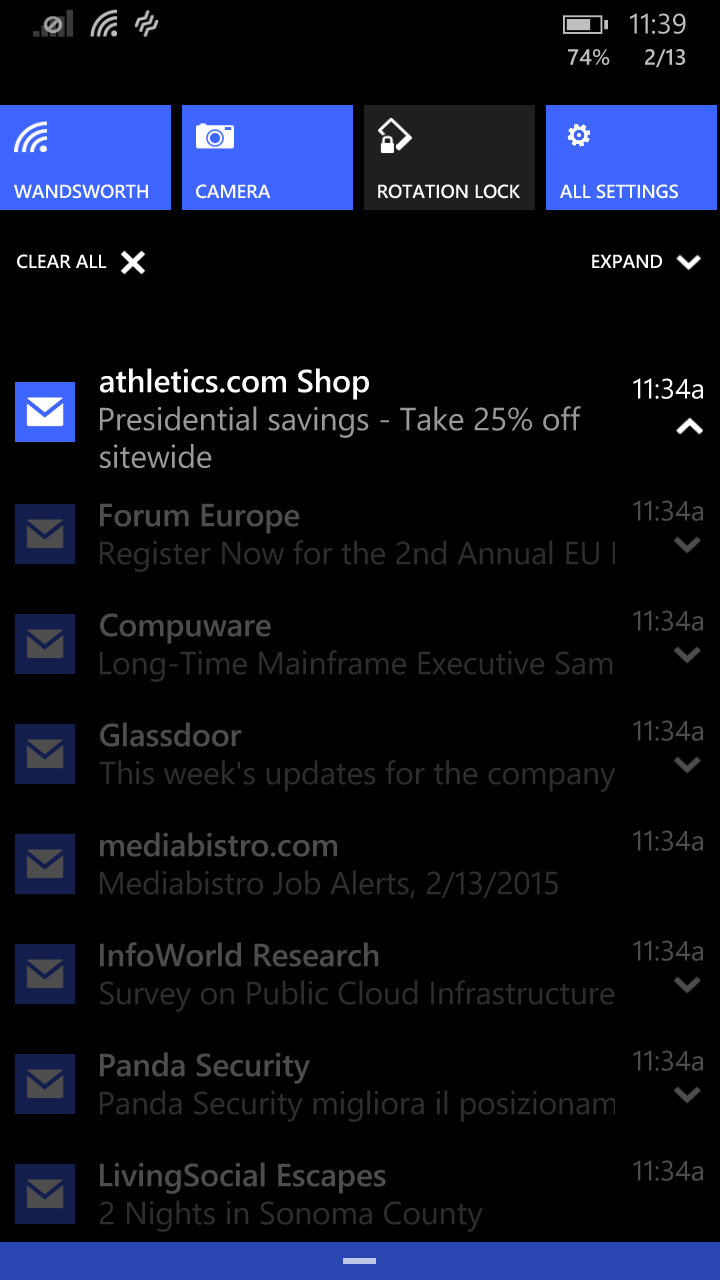
Windows 10’s improved Action Center adds a number of shortcuts to common tasks.
An improved Action Center—the settings shortcuts that can be accessed by swiping down from the top of the screen—also means you won’t have to access the menu, period, as frequently. In Windows Phone 8.1, you have about five to choose from: Wi-Fi settings, Bluetooth, airplane mode, rotation lock, and the brightness controls. With Windows 10, there are a dozen, including toggles for VPN and do-not-disturb Quiet Hours, location, the camera, and more.
MARK HACHMAN
You can swipe this message away, if you’d like.
Many of the basic features of modern phones—and this includes Android and iOS as well—are designed to keep you from diving deep into apps and menus, or at least point you straight to what you want to do. Windows Phone 8.1’s notifications provide a long list of email from various accounts, reminders, and app notifications as well. With Windows 10, you can begin to act on these, swiping an email to the right, for example, to archive it.
You can do the same, according to Microsoft, with new texts and other messages that appear as so-called “toast” notifications at the top of the screen. (I personally haven’t tested this feature yet.) Microsoft says you’ll be able to tap on the message and quickly respond to it, without leaving the app.
The apps menu also shows a section of “recently installed” apps at the top of the screen.
Photos provides a first look at “universal” apps
The technical preview of Windows 10 for phones and small tablets also includes a look at one of the new “universal apps,” Photos.
MARK HACHMAN
Microsoft’s new Photos app in Windows 10.
The look and feel of universal apps will be the same no matter whether they’re on a phone, tablet, or PC. On Windows Phone 8, the Photos apps places a slight border around each image, and it only shows images stored on the phone itself. On Windows 10, Microsoft has removed the border, and Photos now displays images on the phone and on OneDrive. Moreover, Photos includes the “albums” feature Microsoft added to OneDrive last month. About the only bug I found is that photos taken with the phone don’t seem to upload to OneDrive, even if backup is turned on.
A keyboard joystick?
There’s one other feature that may be of interest within the technical preview: a small “joystick” that appears within the soft keyboard. When editing text, Microsoft’s Windows Phone highlights entire words by default, making typos (such as a mistyped character in a password) difficult to correct. The joystick steps in and allows you to step through words, character by character.
The last improvement is strictly aesthetic: Microsoft has changed the Live Tile structure again, so that you now can add a background. That’s a slight change from Windows Phone 8.1, where the “background” is contained within the Live Tiles itself. Now, it swims “underneath” the tiles themselves.
MARK HACHMAN
Note the blue dot to the bottom left of the screen. This new Windows 10 for phones “joystick” allows you to step through text, character by character.
I’ve said before that Windows 10’s goal isn’t to sell a particular device or operating system, but to sell the integrated Microsoft ecosystem as a whole. I continue to believe that Windows 10 isn’t moving so much ahead as laterally, tying other Windows devices more tightly together. As a whole, however, Windows continues to improve. I’m eager to see what subsequent builds have in store.
This may seem like a simple task to most people, but I was surprised recently when multiple people asked me how they could go about changing the default sound for Notifications in Windows 8.1. Windows 8.1, of course, is the mismatched version of Windows that seems like it was never quite finished. Some have gone as far as to say that Windows 8.1 is the Frankenstein monster of Microsoft's operating systems because it seems pieced together, combining functions from Windows 7 with a new UI that seems partially stitched together. For example, some Windows settings still exist in the old Control Panel while a small portion sit in the new Windows Settings app.
And, this is the case when attempting to change the default Notification sound for Windows 8.1. If you look in the spot you would expect to be, it's just not there. Changing how Notifications work is available in the new UI, but it doesn't give the option to actually change the sound.
Instead, you have to rely on the old, trustworthy Control Panel to accomplish this feat.
So, to get this done, do this:
Open the Control Panel Sounds applet, but searching for and executing Change System Sounds.
When the app opens, locate Notifications in the Program Events list.
Use the Browse button to open a File Explorer dialog to allow you to search through the list of available sounds.
Windows 8.1 stores sounds files in %windows%\Windows\Media. Even though you can select any sound anywhere in the file system, you should consider storing them all in this provided folder so they are always easy to locate. You can add your own sound files that you find on the Internet or create on your own.
As we've seen in recent Windows 10 Builds, Microsoft is making a concerted effort to merge all old Control Panel applets and Windows 8.1 UI settings into a new, standard location. So, the in future you won't have to look in multiple places just to find a simple Windows setting.
Microsoft this week, at its Windows 10 extravaganza in Redmond, announced that Windows 10 will be a free upgrade for users of Windows 7 and Windows 8 systems once the new operating system releases. And, even though Terry Myerson clearly said that the upgrade is free, the details of the statement continue to be parsed out in excruciating and annoying detail.
Here again, is exactly what Terry said, and even reiterated later in a blog post:
This is more than a one-time upgrade: once a Windows device is upgraded to Windows 10, we will continue to keep it current for the supported lifetime of the device – at no additional charge.
Many are spending just too many cycles trying to figure out which word in Terry's statement to emphasize, believing that Microsoft is trying to sneak one over on them – basically offering a free upgrade in one hand but hiding a bombshell in the other. The bottom line is that this is a free upgrade, no strings attached.
Note that this offer is only good for consumers – it doesn’t apply to businesses. And, that's where this actually gets a bit sticky and where folks should be spending concerns. I'll be spending some time over the next week deciphering some new business licensing rules for Windows 10, how it will be offered as an upgrade, and what it will cost going forward. Stay tuned for that.
Windows 10 Build 9926 rolled out yesterday. Both Fast ring and Slow ring users received it at the same time. This is a first since Microsoft instituted the two ring deployment process. Windows Insider chief, Gabe Aul, stated the reason is simply because a new Build didn't deliver in December and Insiders were both hungry for a new Build and hankering to get their hands on the new features announced this week at the Windows 10 event. We'll be digging into some of the more important new features this next week.
I forget the exact number, but this week's Windows 10 event caused around 200,000 new signups to happen for the Windows Insider program. That means there's a lot of Windows Insider newbies wanting to install the new Build, most of which are running Windows 7 and Windows 8. So, with this and Microsoft professing the free upgrade deal, Build 9926 comes with an upgrade feature which will be used for testing the final upgrade process.
Access to this feature is available for Windows 7 and Windows 8 users inside the Windows Update component in Control Panel after you install a special preparation tool from the Windows Insider web site. Of course, you must first be a member of the Windows Insider program.
If you choose this option, let us know how it works for you. I tested on a single, Windows 8.1 machine and the process was clean. It did take a considerable amount of time to complete, requiring the download and a reboot before the upgrade actually kicked off, but it worked just fine. Upgrading means you retain your settings and applications versus a brand new installation that wipes out everything and leaves you with a stark, pristine Windows 10 environment.
Please note that Windows 10 is still very much a beta product. Unless you're a technical guru, install any Windows 10 Build on a test machine, not one you count on for everyday use. There are a number of issues already reported by testors and even some known issues already communicated by Microsoft. One of the issues important to know for the upgrade is that Windows 10 does not yet support installing on a compressed drive.
During Microsoft's recent Windows 10 ultimate reveal (my term, coined in a recent Short Takes), we saw tidbits of the next Universal Office in demos of upcoming products launching as part of the Windows 10 wave. The demos highlighted what we've all been waiting for, touch-first Office applications. Office for Windows 10, as Microsoft is calling it, will bring a touch-optimized experience of Word, Excel, PowerPoint, OneNote and Outlook to small screens. For phones and tablets running Windows 10, the new Office apps will come pre-installed. If you want a good first look for touch-heavy apps, Microsoft will deliver them as part of a new Windows 10 Technical Preview build in a few weeks. If you're not part of the Windows Insider program yet, this is a good reason to join now.
Additionally, and despite it releasing in the 2015 calendar year, the next version of Microsoft's desktop productivity suite will be titled Office 2016. Office 2016 is the update to Office 2013 and will continue to deliver an optimized experience for mouse and keyboard users. Reports suggest that this version of the next Office is already in limited testing by unnamed customers.
I'm providing some screenshots of Office for Windows 10 below and I think it's important to highlight something for the keen eye. The UI is very similar to what Microsoft has built into the apps for iPad and Android tablets already, and may seem additionally familiar toWindows 8.1 users – particularly the next version of Outlook. This version of Outlook looks strikingly similar to the Mail app that comes pre-installed with Windows 8.1, which is decidedly not the best design, suffers from lack of robust functionality, and is often times severely quirky. But, I'm sure Microsoft has already taken those flaws under consideration.
Outlook for Windows 10
Word for Windows 10
Excel for Windows 10
PowerPoint for Windows 10
OneNote for Windows 10
To get a deeper look before the preview is available, join the Office Mechanics in a 7 minute tour…
As the tech world gradually digests the major Windows keynote event earlier on this week, Microsoft has wasted no time in pushing out the latest Technical Preview of Windows 10, which is available now to download and install. With so many exciting announcements having been made during the past 48 or so hours, there’s definitely a renewed optimism of the direction the software maker is headed, and below, we’ve got all of the relevant details regarding this latest Technical Preview.
Microsoft promised at its big event that the Windows 10 January Technical Preview would launch for those subscribed to the Windows Insider Program. If you are a member, you can now upgrade or install afresh, and once you have, there are plenty of new features to look forward to.
With the January Windows 10 Technical Preview, you do, of course, get your usual assortment of bug fixes and performance enhancements. But Microsoft has also listed just over half a dozen more significant features and additions to the fold, pertaining to design, functionality, and integration with the Redmond’s wider product range.
The Xbox App, for example, will let you view your friends’ activities and post to their timelines, as well as view DVR videos directly from your Windows 10 machine. Xbox One to PC streaming is forthcoming, but for now, there is still plenty for Xbox fans to be getting on with.
As we heard on Wednesday, Cortana will be a major component of Windows 10 looking ahead, and with the new Technical Preview, the voice assistant is built into the search feature of Windows 10. Microsoft has also done away with the Charms bar, replacing it with the new Action Center that also houses all your notifications in one place, and there are plenty of general design tweaks to be found across the board.
It’s worth mentioning that today’s release does not come with Microsoft’s new browser, codenamedProject Spartan, and will likely ship with a new Technical Preview in the weeks / months to come, so be patient for that.
With Continuum – the feature that promotes seamless, mid-task switching between tablet and PC – also making the cut, there are multiple reasons to jump on this Technical Preview.
If you’re already running the older version of the Technical Preview on your PC, then navigate to PC Settings > Update and recovery > Preview builds and simply click on the Check Now button. The update will pop up in a snap, ready to be downloaded.
If you’re starting fresh, then check out our guide on how to install the Windows 10 Technical Preview, linked below:
During today's press event for Windows 10, Microsoft delivered a huge number of announcements. Some small, some large and we'll be covering all of them here on Supersite over the next few days and weeks. We'll announce the new features and also deliver some needed commentary to help you get a better understanding of how Windows 10's advancements will affect you personally.
One of the most sought tidbits of information about Windows 10, though, has been price. Features, after all, are just icing on the cake. So, what will Windows 10 cost?
Terry Myerson, Microsoft's Executive Vice President of Operating Systems, took the stage first today and surprised the crowd by giving an official statement on pricing.
When Windows 10 officially releases, users of Windows 7, Windows 8, Windows 8.1, andWindows Phone 8.1 will be able to upgrade to Windows 10 for free. That, by itself, is awesome news. But, of course, there's a caveat. Microsoft really, really wants users to install and use the new OS, so the company is putting a deadline on the deal. One year after Windows 10 releases, the new OS will no longer be offered as a free upgrade. Myerson gave no indication of what the upgrade might cost after that.
So, what will it cost? It's free. For a while. After that…
This is more than a one-time upgrade: once a Windows device is upgraded to Windows 10, we will continue to keep it current for the supported lifetime of the device – at no additional charge.
And, this clearly answers the bigger, lingering question of the day brought on through the confusion of touting Windows 10 as "Windows-as-a-Service." And that is - will Windows now come with a subscription model? The answer is 'no.' Once you choose to upgrade, the OS is yours to keep for the life of the device.
Late last year Dropbox announced that they had entered into a partnership with Microsoft. When this partnership was announced, the first benefit that it brought to consumers was Dropbox integration in Microsoft Office. This allowed users to choose between using Dropbox or Skydrive as a medium for storing all of their documents in the cloud.
Today Dropbox announced the next step in this partnership with the launch of an official Dropbox application for Windows Phone. This completes support for Dropbox on devices in the Microsoft ecosystem, with a Modern UI application for Windows PCs and tablets having been available since the beginning of 2013. It has definitely taken a while for it to move to mobile, but it's good to see another developer making apps for Windows Phone. The app is available for any users running Windows Phone 8.0 and above, and includes all the features you'd expect from Dropbox, as well as some Windows specific abilities like pinning Dropbox folders as Start Screen tiles.
For the first time ever Microsoft demoed Windows 10 running on a phone. It also marks the occasion where the software giant is also giving up on the Windows Phone name and is unifying what its next-gen operating system would be called. And here, we look at all the new features which Microsoft has announced for Windows 10 running on a smartphone.
Backgrounds
Where both iOS and Android offered background wallpapers quite early on in their respective lives, Microsoft has made a song and dance of this relatively basic feature. Up until Windows Phone 8.1, wallpapers didn’t exist, and then with last year’s upgrade, we finally saw support in the form of mosaic-like overlay support.
But not everybody wanted their background in the foreground, plastered all over the tiles, and so as of Windows 10 for phones, the iOS / Android-like wallpaper will be offered. Tiles will sit above the backdrop, and although it has taken Microsoft a while to get here, this more traditional setup is a great deal easier on the eye.
Settings
Navigating through the Settings app on Windows Phone has always felt like a bit more of a struggle than it should, but with Windows 10 for phones, this’ll change. As you can see, the app is a lot cleaner, easier to digest, and should make quick-fire configuration a bit less tedious.
Skype Integration In Messages
In the search of unification, Skype messages can be processed through the stock messaging app with Windows 10 for phones. Users will be able to flit between SMS, Skype and some other services, and on first glance, everything looks nice and organized.
Action Center
The Action Center in Windows 10 has been reworked, and notifications now sync with your PC, assuring that you don’t miss a beat regardless of the device you’re on.
In-Line Notification Replies
Yep, that’s right. Rather than jumping into your email client to respond to an email or messages for SMS, you can respond directly via notifications with minimal fuss. It’s something that Apple also recently introduced with iOS 8, much to the appeasement of the iOS community, and so those indulging in Windows 10 should also welcome these tweaks.
Floating Keyboard
The keyboard can now be moved around on the display anywhere the user wants it to be, rather than sitting at the bottom of the display, which has been the default location since the inception of Microsoft’s mobile platform.
Universal Apps
Microsoft is building / expanding upon a number of services designed for PC and smartphone. These include the People and Music hubs, Office, Photos app and Maps – all of which will be treated to a fair few adjustments.
Notably, Maps will include support for the Cortana voice assistant, a feature that, for those in doubt, will almost certainly prove integral to the wider Windows 10 experiences.
Microsoft also has a brand iOS-like new fully touch optimized Office apps in the works, and as you might’ve figured by now, will be a universal offering for desktops, tablets and phones.
There’s also a brand new Photos app, which is also a universal offering, and it ties in nicely with all your connected Windows 10 devices, bringing all your snaps in one place, including those uploaded to OneDrive. The app is truly brilliant in what it does, and it also prevents duplicate photos from popping up into your gallery, making sure that everything looks clean and uncluttered.
All of the above mentioned apps will run on all devices, and will be scaled intelligently depending on the gadget you happen to be using Windows 10 on.
So, that concludes our round-up of Windows 10 for phone features. It’s likely that Microsoft will continue to make changes and alterations before the point of release, however, and so we’ll be keeping an eye out for any further updates in due course.
Anticipation for the next Windows 10 reveal event is definitely growing. I can't remember an hour in the last several days when yet another "what to expect" or "more details emerge" article pops into my view stream. I'm taking all of them with a grain of salt, and you should, too. What we think and what we surmise usually takes on a very different final image when it comes to Microsoft announcements. It's just a safer bet to keep expectations low.
But, I think there's one thing we can be sure of: there will be something for everyone. In just two days, Microsoft is expected to deliver its Windows 10 message, and according to most, the central message will actually be less about the operating system and more about the computers and devices it will run on.
I believe it'll be less about Windows 10 pricing (which some are expecting to hear – though personally I think it's too soon to expect this – but I could be wrong), and more about the hardware that Windows 10 will run on. Windows 10 marks the first time Microsoft is seeking to merge all of its OS's into a single version that can be installed across the multitude of devices it produces itself, and the devices it expects its hardware partners to develop. The hope is that Windows 10 will supply computing to Windows Phone, Windows PCs, Windows devices, and even the Xbox One.
I've been testing Windows 10 on my original Surface Pro as part of the Windows Insider program. Up till now, I've been less impressed with its capabilities, new features, and changes than I think anyone I've talked to or article I've read. I'm a fan, I'm just not as ready as some, I guess, to go all in and give Microsoft an undeserved medal. I'll go into the reasons why I'm not as enamored by Windows 10 as some are in a future article.
Yes, it's Windows, and it's new. But, what will impress me most is when my Windows Phone, Surface Pro 3, and Xbox One all deliver a seamless experience. I believe the Microsoft services platform is extraordinary. I constantly rely on Office 365, OneNote, OneDrive and others be successful. I'm waiting to hear how Windows 10 will deliver on this.
We'll be covering the event and all the announcements here on SuperSite and also WindowsITPro. For those that would like to join in, the important parts of the event will be streamed live. Here's the details:
Microsoft has officially ended mainstream support for Windows 7. Before you panic, this means that no new features will be implemented. However, you will continue to receive security updates to known issues for 5 more years. That’s a good thing as well because Windows 7 still retains 56 percent of the desktop operating system market share.
Windows 8.1 Still Struggling for Market Share:
Windows 8.1 that has been in troubled waters for a while. The extreme makeover that Microsoft tried to present with a seemingly innovative Windows 8.1 could only help secure 9 percent of the market share. That may be more than Apple’s Mac OS, sitting at 5 percent, but well below 18 percent under the grasp of Windows XP. The fact that it has half the share of an OS that was launched an eternity ago says everything.
So, What Went Wrong With Windows 8.1?
Microsoft clearly missed a trick by trying to impose upon users an interface with a full blown Start menu. It’s really about time that developers came to terms with the fact that simplicity of an interface has no parallel. Microsoft seemingly realizes that doing away with the traditional Start menu was a shortcoming they could ill afford. Their efforts to build an all-in-one OS that could handle touch as well as traditional PCs seems to be a huge mistake in hindsight.
What About Windows 10 Then?
Microsoft is serious about redeeming itself with Windows 10, and it shows with the beta previews. The traditional Start menu has now been reintroduced to users. Microsoft would be hoping that users finally move on from Windows XP and Windows 7. With intuitive features such as multiple desktops, snap enhancements, enhanced file explorer and a task view button, it aims to build on the simple Windows experience that users are well accustomed to.