Powered by Blogger.

Games

Showing posts with label OS X. Show all posts

OS X Yosemite 10.10.2 Download Released

Tuesday, 27 January 2015

Along with the roll-out of iOS 8.1.3 download, Apple has also introduced OS X Yosemite 10.10.2 to the fold. As indicated by the version number, it’s more of a bug-fix update that improves general stability and functionality than one offering any notable new features, and you can find the full details right after the leap.
Yosemite has enjoyed a largely incident-free route to market since hitting the Mac App Store late last year, with relatively few bugs or major issues having arisen during what remains its infancy. Often, those teething issues can hinder the transitional period for many users, but while iOS 8 did hit a couple of roadblocks when it first trickled out to the community, the same cannot be said for the latest flavor of OS X.

OS X 10102 main
Despite the lack of any significant problems, though, Yosemite has endured one or to minor issues, and with today’s launch of version 10.10.2 via the Mac App Store, Apple has sought to address them.
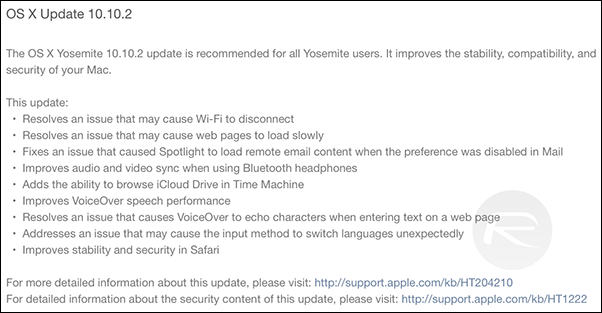
For example, some some users have found their Wi-Fi to randomly disconnect without warning, while others have been forced to endure slow-loading Web pages. OS X Yosemite 10.10.2 should fix these bugs, as well as others pertaining to Spotlight, VoiceOver and Safari.
As reported in the release notes, this new edition of Yosemite also improves audio / video sync when using Bluetooth headphones, and as of this update, Time Machine users will also be able to browse iCloud Drive.
Screen Shot 2015-01-27 at 11.03.33 pm
iOS 8.1.3′s imminent release had been touted throughout January, and now, both mobile and desktop software have been updated at the same time. On first impressions, both OS X 10.10.2 and iOS 8.1.3 seem fairly innocuous and unspectacular, but until we’ve had a proper chance to take a look at it, there’s no telling what Apple may have sneaked into these releases without revealing in the notes.
Still, we’re installing OS X 10.10.2 Yosemite as we speak, and should we stumble across anything worth discussing, we’ll be sure to update you guys accordingly.
As ever, you can update your Mac via the Mac App Store under the Updates tab, where the update should be live immediately, and if you happen to find anything of note once you’ve installed and rebooted, be sure to let us know via the comments section!

How To Get Facebook Messenger Chat Heads On Mac OS X

Friday, 16 January 2015

Here’s how you can get Facebook Messenger Chat Heads on Mac OS X. More details and download links can be found right here after the break.
Facebook Chat Heads not only look brilliantly cool on any smartphone platform, but conveniently allows users to reply to incoming messages from friends outside of the app, except on iOS. The same convenience has now been brought to your Mac by developer Raffael Hannemann, with an app aptly titled ‘Chat Heads’ for OS X.
shot1_conversation
Allowing users to send messages back to their friends by simply clicking on the face bubble which pops up on your desktop, the app also supports sending Stickers, just like how you would from the Web version of Facebook. To avoid having the Chat Heads crowd your desktop, you can move conversations around and snap them to the edge of your Mac’s screen. Like the Web version, Chat Heads will also let you see when your friend is busy typing in a reply on the other side.
The app packs in a bunch of features, including different conversation styles, going through the chat history, filtering between read and unread messages, and more. The app can be grabbed for free but has some in-app purchases to be made if you want to add additional features to the overall package which you get for free, such as getting OS X notifications on new messages and spellchecking.
2
If you’re an avid Facebook user, but found keeping up with your friends a bit tedious over Messenger, then the Chat Heads app for OS X is a must have to help you connect with your friends and keep track of all incoming messages while managing other tasks.
3
Chat Heads is compatible with OS X 10.8 or above, and can be downloaded from the Mac App Store for free.
If you do happen to download it and take it for a spin then do let us know in the comments section below how it fared for you. We love to hear from you guys.
(Download: Chat Heads for OS X on the Mac App Store)
Be sure to check out our Mac OS X Apps Gallery to explore more apps for OS X powered computer.

How To Watermark Photos And Images On Mac OS X In Batches

Tuesday, 13 January 2015

In this day and age we’re all creating data left and right that invariably goes online and then lives forever. Depending on the content that’s great, but it also means that people can take that content and claim it as their own with relative ease. That’s just not cool, and it’s a particular problem for those that create images or text and put it online for all to enjoy.
While you can do little to stop someone stealing your words as their own, photographs can be watermarked. Watermarks are little pieces of text or a logo that gets embedded into the photo, usually somewhere inconspicuous, and makes it possible to identify an image’s origins should the need ever arise. Watermarks can be very important to anyone looking to protect their intellectual property online.
watermark plus main
But you’ll want an app to do it, and the excellent Watermark Plus just so happens to be on sale, and will set you back on $4.99, which is pretty cheap considering what it has to offer to users.
1
If you do decide to make Watermark Plus your watermarking app of choice then you won’t be disappointed, because it has all the features you’re likely to need as well as a few that we expect you might be surprised to find, too.
2
Firstly, you can obviously embed watermarks with little fuss, and those watermarks can be configured in a variety of ways with orientation, opacity and location all under the control of the user. Want all of your watermarks to be in the bottom-left corner of your images, but be barely visible? No problem, and once set up you need not go through the hassle of manual placement or configuration again.
3
Importantly, you can tell Watermark Plus to add watermarks to all images in a folder rather than having to do them one-by-one too, which can be a lifesaver. You can also have the app resize images or re-encode them to different formats, too.
Watermark Plus is well worth checking out, especially at its current price. There’s an iOS app that works just as well too, so be sure to give that a try too.

How To Fix OS X Yosemite Spotlight Bug That Can Expose All Of Your Private Data

Friday, 9 January 2015


If you thought those little bugs in OS X Yosemite were all you had to deal with, wait till you check out this next one. According to tests conducted on the latest version of Apple’s OS X platform, Yosemite carries a privacy glitch in the Spotlight search feature, releasing some very sensitive data to spammers, phishers, and online tracking companies. What information are we talking about here and how is this happening? Head on after the jump for further details.
 

Most Reading

Sidebar One