Powered by Blogger.

Games

Showing posts with label web Browser. Show all posts

Fuck It, I'm Going Back to Firefox

Tuesday, 17 February 2015

Fuck It, I'm Going Back to Firefox
Remember when we all switched from Firefox to Chrome? Chrome was stripped down, simple but fast as hell. It was like browsing the web on a whole new computer. These days Chrome is bloated, slow, and constantly crashing on me. I've finally reached the breaking point.
I've been revving myself up to switch for a while now, as Chrome has steadily gotten worse and worse. The writing has been on the wall for years. In 2011 Google was already "aggressively looking at options to bring down the size of Chrome distribution binaries."
Of course the install size is nothing compared to the memory usage problems. A cursory Yahoo! search (Yep, I am really using Firefox right now!) turns up all kinds of complaints and pleas for respite, sprinkled across the years. But more damning is just opening up the task manager to see for yourself.
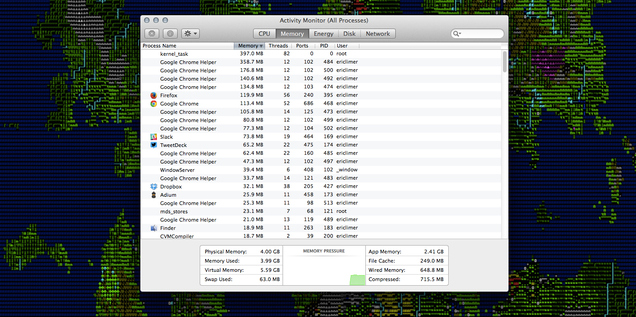
Fuck It, I'm Going Back to Firefox
Fresh off a reboot, handful of tabs open in each. WTF are you all "helping" with?
Add in frequent crashes—of Chrome on the whole, or just the Flash player—lock-ups, and a half-dozen tabs that auto-open on launch thanks to the dozens of extensions I've accumulated over the years, and I've had enough. I've been trying to optimize for months—I installedFlashblock, I disabled Hangouts and other cruft—and yet still things have still gotten markedly worse. I just can't take it anymore.
I've known things were bad, but what pushed me over the edge to actually switch was when I fired up Safari yesterday, to make sure that an issue I was having with Gizmodo dot com was not Chrome-specific (BECAUSE I WOULDN'T BE SURPRISED IF IT WAS). It blew my god damn hair back. It was... fast!
Why Firefox instead of Safari then? Mostly the same reasons I didn't switch to Opera or something. Firefox isn't the fastest or most stripped-down browser out there. In fact, it was the one bloatwared up when Chrome first came along. But at this point, it's performing far better than Chrome (for me, so far) while still offering a lot of the same now-necessary creature comforts that kept me in my Google-based browser prison for so long.
Firefox has a big library of extensions (including obscure must-haves like Cloud-to-Butt Plus). Firefox has an Android app, should I eventually choose to take the plunge and ditch Google's browser on my phone too, instead of just using Pushbullet to get things back and forth between my phone and computer for now. It's even doing cool (if superfluous) shit like supporting the Oculus Rift! But most importantly, it's an asston faster—and so far, more reliable— than Google Chrome.
Switching isn't hard. Importing Google history and settings into Firefox (an option you get on install) is like coming home to a new house to find that most of your stuff is already there. I've had to go hunt down a few extensions (LastPass, for instance) and switch the default search engine from Yahoo! to Google. Also, weirdly, Gmail refused to load until I cleared my cache. But otherwise the transition has been pretty painless. Waaaaay easier than I thought. Why did I put this off for so long?
If you're sick of the crashing, the memory hogging, the performance issues, the bloat, just do it. Switch. You know you've been thinking about it and I am here to push you over the edge.Download the latest version of Firefox and you're off to the races.
It's good to see you old friend. I didn't realize how much I missed you. 

Major Vulnerability In Adobe Flash Found, Here’s How To Disable It In Your Web Browser

Monday, 2 February 2015

In news that won’t shock too many, a major flaw has been discovered in Flash. Yet another zero-day vulnerability for the video plugin software to add to the collection, this particular variant leaves PCs susceptible to hijacking, and if you want to protect yourself by quickly disabling flash, we’ll be showing you how to do so below.
Despite its ubiquity, Adobe’s Flash Player has come under huge scrutiny over the past decade, and seems to typify everything bad about a piece of software. It’s resource-hungry, buggy and sluggish, throwing up vulnerabilities like confetti, and the latest – CVE-2015-0313 – has left Adobe with its third exploit to patch in just two weeks, but with large parts of the tech community shunning Flash in their droves, we’re going to show you how to disable it once and for all.
Adobe Flash main
Firefox
Step 1: Open up the Firefox browser.
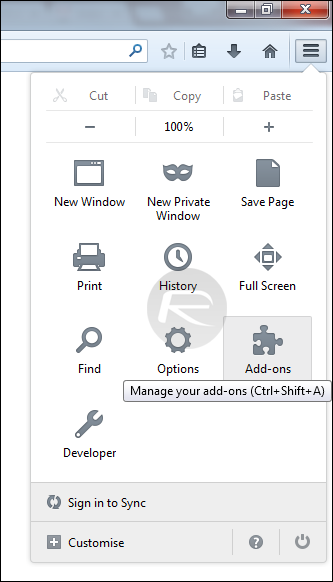
Step 2: Hit the Settings icon represented by three horizontal lines in the top right-hand corner.
Step 3: Click Addons, then Plugins.
FFOX1
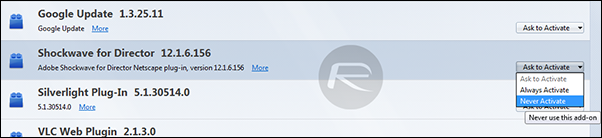
Step 4: Next to any Shockwave or Flash-related objects, you’ll see a drop-down menu. Click on it, and set it to ‘Never Activate.’
FFOX2
Internet Explorer
Step 1: Open your IE browser.
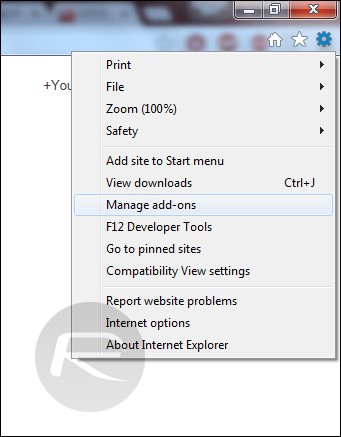
Step 2: Hit the Settings icon represented by the gear-like image in the top right-hand corner.
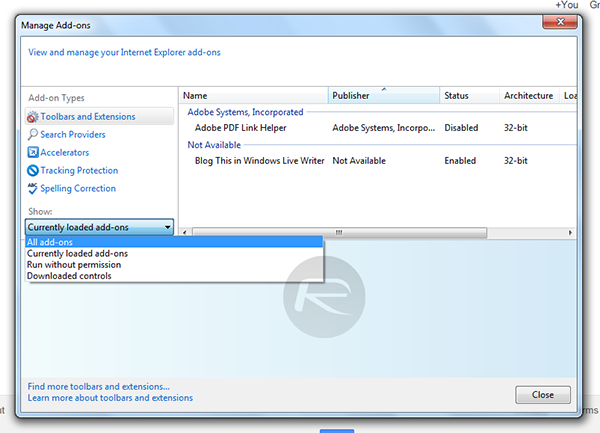
Step 3: Select ‘Manage add-ons’ from the drop-down menu.
IE1
Step 4: Under the ‘Show:’ drop-down, select ‘All add-ons.’
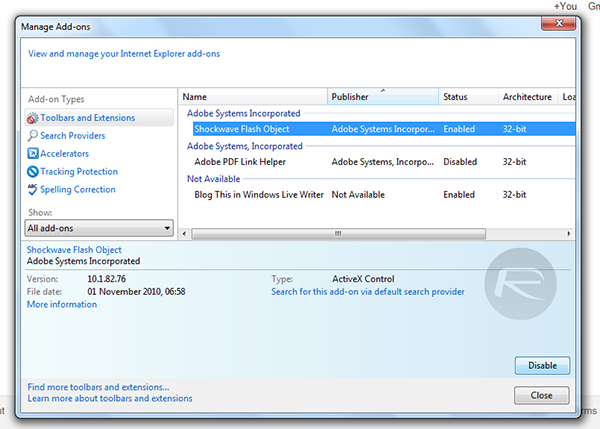
IE2
Step 5: Finally, select Shockwave Flash Object, and in the bottom right-hand corner, select ‘Disable.’
IE3
Opera
Step 1: Open up Opera.
Step 2: In the URL bar, type “about:plugins.”
Step 3: Navigate down to Adobe Flash Player and select ‘Disable.’
OP1
Chrome
Step 1: Open Chrome.
Step 2: In the URL bar, once again type “about:plugins.”
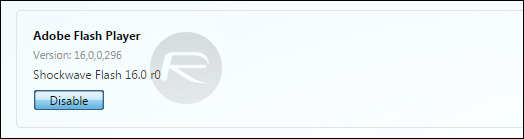
Step 3: Navigate down to Adobe Flash Player and select ‘Disable.’
GC1
Safari
Step 1: Open Safari.
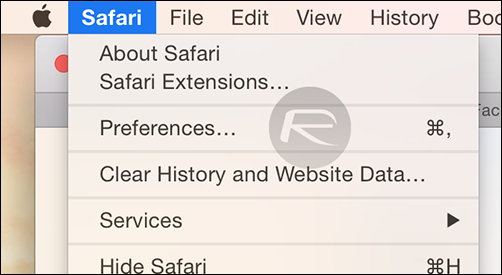
Step 2: Click on Safari in the Menu bar and then ‘Preferences.’
1
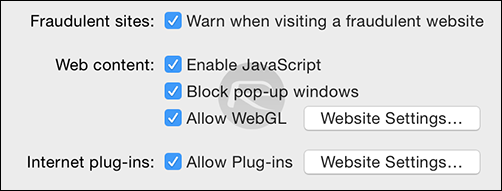
Step 3: Now click on ‘Security.’
Step 4: Click on the ‘Website Settings…’ button next to ‘Allow Plugins.’
2
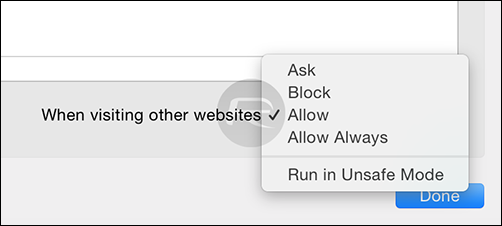
Step 5: Select ‘Adobe Flash Player’ from the left hand-side menu and then select ‘Block’ in the‘When visiting other websites’ drop-down menu.
3
There’s no fix for the (latest) 0-day vulnerability as yet, but irrespective of Adobe’s plans to release one in the very near future, your best bet is to disable Flash indefinitely and continue about your business.
The Internet has evolved to the point where enabling Flash is no longer a necessity for day-to-day browsing, something which was further cemented by YouTube in its latest move to ditch Flash completely, and by following the steps outlined in the tutorials above, you’re actually safeguarding yourself from the continued, inevitable issues that arise with this antiquated piece of software.

New Leaked Screenshot Of Spartan Gives Us A Clear Look At Microsoft’s New Web Browser

Sunday, 11 January 2015


Another screenshot of Microsoft’s upcoming Web browser for Windows 10 – codenamed ‘Spartan’ – has been leaked online. If you’ve been closely following all Windows 10 developments so far, you would know that the ‘Spartan’ browser along with Cortana, are some of the most anticipated offerings Windows fans are looking forward to checking out when the desktop OS is released.
 

Most Reading

Sidebar One