Powered by Blogger.

Games

Showing posts with label web. Show all posts

Watch Cricket World Cup 2015 Live Stream Online On iPhone, Android, Web, Apple TV

Saturday, 14 February 2015

The Cricket World Cup is now upon us, and having already gone through the steps necessary to add the entire schedule to your Google Calendar, we’re now going to point you in the direction of the numerous ways you can stream the action live. Because different companies and broadcasters have the definitive say on how you can watch the CWC ’15 matches dependent on your location, you may not be aware of where you need to go or what you must download in order to catch this showpiece event, so to help you out, we have created a run-down below as a point of reference.
To make things nice and easy, we’ve divided everything up into countries / continents, so check the headings, and in no time, you’ll know precisely how to get your Cricket World Cup fix.

cricket world cup live 2015 main
Watch Cricket World Cup 2015 Live Stream In United States

Flag_of_the_United_States
As we first learned back in late January, ESPN will be streaming the cricket to Stateside audiences – even those without a cable subscription. It’s all part of a move to boost the popularity of the sport in the U.S., which, while enjoying a strong following in much of Asia, Europe and the West Indies, isn’t as closely followed by a consumer market that prefers its NBA, NFL, MLB and such.

IMG_1150
The one-off, untethered package costs $99.99, and offers the full works as far as the CWC is concerned. You get live broadcasts of every single match, action replays and highlights of all the best bits, as well as ESPN’s very own Match Point show, offering analyses from some of the biggest names in the sport.
Once you’ve snapped up the offer, you’ll be able to log in and enjoy the coverage on all devices, including Android, iOS, and Apple TV.
You can download the ESPN Cricket 2015 app for iOS from here, Android here.
ESPN site: espn.go.com/espncricket2015
Watch Cricket World Cup 2015 Live Stream In United Kingdom

UK copy
BSkyB, as it does in the UK with the big sports events, has the Cricket World Cup covered this year, with its popular Sky Go app covering iPhone, iPad, Android and desktop to paying subscribers. Its NOW TV service, which can be found on iPhone, iPad, Android and Apple TV, does not require a subscription, and with the Day and Week Passes available, you’ve flexibility over which matches you wish to pay for.
You can download the Sky Go app for iOS from here, Android here. NOW TV app for iOS can be download from here, Android here.
Watch Cricket World Cup 2015 Live Stream In India

India
Cricket is huge in India, and so if you have the Star Sports app running on your iPhone, iPad or Android device, you can follow the entire Cricket World Cup 2015 event for just $2.50, which is available as an in-app purchase.
You can download the Star Sports app for iOS from here, Android here.
Watch Cricket World Cup 2015 Live Stream In Pakistan

Pakistan
If you’re in Pakistan, you’ll need to snap up the PTCL Smart TV app, which is available on iPhone, iPad and Android and desktop. You will be required to stump up a fee of just $5 to get in on the action.
You can download the Smart TV app for iOS from here, Android here. On the Web point your browser to: smarttv.com.pk
Watch Cricket World Cup 2015 Live Stream In The Rest Of The World
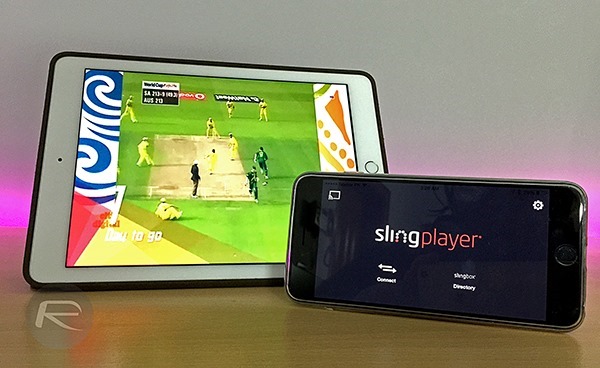
IMG_1146
If you are in Australia, you can catch the action live on live.cricket.com.au/. Those in UAE can catch it all on OSN: osnplay.osn.com/en/Live1/O/OSN-Sports-Cricket/
Alternatively, you can purchase Slingbox, available for $130, which will permit you to watch your entire cable connection, including every single minute of every match on almost every platform you can think of without too much trouble from anywhere in the world using the SlingPlayer app.
You can download the SlingPlayer app for iOS (iPhone / iPad) here, Android (phones / tablets) here.
And there you have it. The Cricket World Cup 2015 is set to be another tense, exciting and generally gripping exhibition, and if you’re a follower, you’ve no excuse for missing out on any of it!

Passwords Leaks: 10 Million Leaked Passwords Hit The Web, Here’s How To See If Yours Is Among Them

Thursday, 12 February 2015

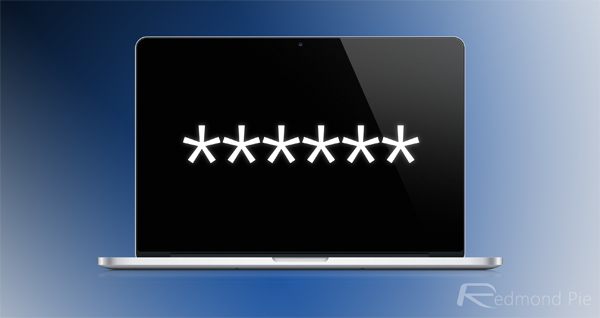
The widespread leaking of passwords and credentials is a trend that just keeps cropping up, but while hackers tend to be culpable in these alarming situations, the latest ‘leak’ of some 10 million passwords is rather bizarre. A security researcher released login information of some 10 million users with noble intentions, the crux of this rationale being to help the wider digital community to better understand user behavior. But with the data now out in the open courtesy of a large torrent file posted by said security expert, there’s relative cause for alarm, and if you want to ensure that your sensitive data is not out in the open, check the details below.

Mark Burnett, the security guru that has made headlines for distributing the password information, notes in a blog post that the 10 million sets of credentials are just a sample lifted from a dump containing in excess of one billion. Thus, it’s just a mere drop in the ocean, and while checking your own email address may provide you with a little peace of mind, there’s certainly no room for complacency.

MacBook-Password

A number of sites have been quickly created allowing users to cross-check their email accounts and ensure that their email accounts have not been pwned, while some pre-existing resources include larger databases containing information on compromised accounts.

If you wish to see if your email is among those leaked in the latest drama, Luke Rehmann has thrown together a Web tool on his site that is primed and ready to identify emails caught up in torrent. To get started, you’ll need to point your browser to rehmann.co/projects/10mil, where you’ll be able to swiftly run your details against all of those that emerged via this torrent file.

Mac-iPhone-61

Other sites like haveibeenpwned.com let you check your email against a larger database containing stolen credential, and so once you’ve used Rehmann’s site above, you may want to have a look at this one as well.

In the unfortunate case that you have been pwned, your first course of action should be to change the password of the account in question immediately. Moreover – and this also applies to those whose accounts aren’t red-flagged – do pick a very strong password that would be impossible to guess, and if you can, change it as frequently as you can.

Google Earth Pro: Google Earth Pro is Gone Free, Previously $399 Per Year [Download Link]

Sunday, 1 February 2015

google earth
If you are a fan of Google Earth, here’s some good news for you: Google has decided to offer the Pro variant free of cost. It is pleasantly surprising to note that a service subscription that used to cost us $399 per year will now require no money whatsoever.
Of course, there are reasons why casual map users would be content with the basic version of Google Earth and didn’t bother paying for the Pro variant that professionals such as scientists would. The primary differences between the two variants lie in features such as automated geographic location and high-resolution imagery.
The basic version of Google Earth restricts users from printing images whose resolution exceeds that of the screen. Conversely, the Pro variant imposes no such limitations; instead it allows high-resolution prints. It also doesn’t impose a maximum texture size by allowing you to use Super Image Overlays.
Similarly, the basic version of Google Earth prompts you to manually geo-locate geographic information system images. The Pro version requires no such task of you; in fact, it saves you the effort by automatically geo-locating those images.
Features like area measurements and animated movie creation that typically appeal to businesses are also exclusive to the Pro variant. In addition, you would have to turn to the Pro version to search for data related to demographics using data layers and multi-point mapping.
You would have to download the software in order to be able to access Google Earth Pro. Since the required registration key is not based on any subscription, you should have no issues getting through. Current users can simply continue using their existing accounts with no expiry date to worry them.

WhatsApp Web Client Launched, Here’s How To Set Up And Use It

Sunday, 25 January 2015

One of the most requested WhatsApp feature has finally arrived. Our favorite IM app has just launched its Web client, meaning that WhatsApp users will now be able to communicate with their contacts right from their desktop. More on this incredible news and how to get it up and running can be found right here.
Aptly titled ‘WhatsApp Web,’ the service is currently available for users on the Android, Windows Phone and BlackBerry platforms. Where’s iOS? Well, users have to wait a while, since according to WhatsApp, Apple has certain platform limitations, so don’t expect it to arrive any time soon.
WhatsApp Web main
Interestingly, the service is only accessible via the Chrome browser for desktop and its Android based app. Mac users cannot access WhatsApp Web via Safari, but can use Chrome for that very purpose, and the iOS version of the Big G’s Web browser isn’t supported either. According to the WhatsApp team, support for more browsers is likely to be coming soon.
Now that we have established where WhatsApp Web will run and where it won’t, we take a quick look at how the service works. Basically the Web client is a mirror of your WhatsApp app, with slight changes to the UI, but nothing Android users won’t be familiar with.
Step 1: Be sure that you are running the latest version of WhatsApp on your smartphone.
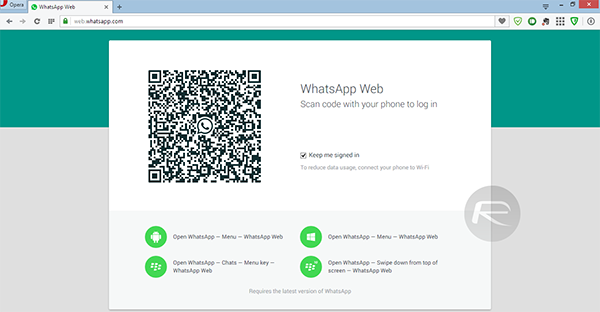
Step 2: Head over to the web.whatsapp.com URL, where you will be greeted with a QR code that needs to be scanned.
WhatsApp Web 1
Step 3: The webpage also lists where you can access the WhatsApp Web option on your Android, BlackBerry or Windows Phone device. Tap that option on your phone’s WhatsApp client, which will launch the QR code scanner.
Step 4: Scan the code and voila! WhatsApp Web should launch in a matter of few seconds.
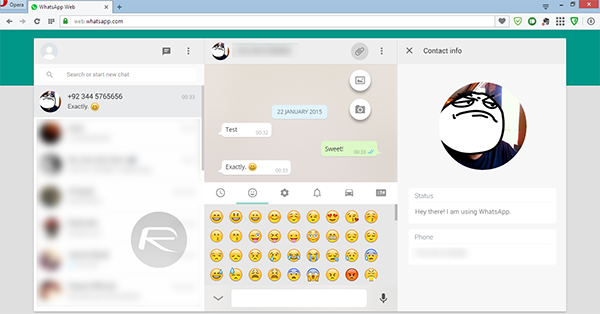
WhatsApp Web 2
Using the service itself is no rocket science and comes loaded with all the awesome functions and features that we have come to know in WhatsApp. The Web client allows users to enable desktop notifications as well which is a pretty nifty addition to the existing features’ list.
If you’re an Android, Windows Phone or BlackBerry user, then we highly recommend that you give WhatsApp Web a shot. And if you do happen to take it for a spin, then do share your thoughts and opinions on it with us in the comments section below.

Are you enjoying very low traffic on you website/blog? Don't Worry! [Here's how to increase it]

Sunday, 18 January 2015


I'm sharing you how to increase you traffic and alexa ranking here are 3 Best ways to increase it which i'm also using.

AlexaBoostup:

AlexaBoostup is a free online tool that helps you to get more targeted traffic to your site. This site provides points for surfing websites, once you have enough points you can use them to get traffic to your site which ultimately helps you to increase the Alexa rankings.

The majority of users which it sends to your site has Alexa toolbar installed in there browsers, which helps you to get a better Alexa ranking as quickly as possible.

You can earn points by surfing different websites or by referring a friend. You can also buy paid impressions, as they have a cheap price of 5000 unique impressions per $5. Its free, its paid and it really works.

How to Increase Alexa Ranking using AlexaBoostup?

The very first thing you need to do is to register a new account at Alexaboostup.com, during registration it will ask all basic necessary information about you which should be filled accurately.

After registering for an account, you can login to the site to proceed to the next step.  Now you need to add your site, so that people can start visiting your site to help you increase your Alexa rankings. Go to >> Manage website >> Add New Website.

Carefully insert your website’s title and URL. You can allocate points to your site 1 point mean 1 visit. However, make sure you have points in your account, if you don’t then you can earn points by referring friends or surfing other websites.

You need to surf a website for 30 second to earn 1 point. It’s just like, you surf my site and I’ll surf yours. Once you have collected enough points, you can allocate them in your site to give a boost to your site’s rankings.

We hope this tutorial may have helped you to learn how to guarantee increase your Alexa rankings.  What do you think about Alexa? Does it really matters? If yes, then let us know about your opinions in the comment below.

Hit4Hit

Hit4Hit.org - Promo Banner

Hit4hit is another best way to increase your alexa rank and trffic

Hit4Hit.org is a community dedicated to bring more traffic to your website. They are building a system to make your website more SEO (Search Engine Optimization) friendly.

Why is that important?

Google, Yahoo, Bing, and other search engines take in the account number of unique visits made every day. More views, means more likely that your page or status will appear on the search results. The math is simple. More visits, means higher status, and more exposure.

System

Hit4Hit.org website, and it's system is programed from the ground up, and do not contain any third party programs, plugins, and component. The team of programmers have a mission to develop natural flowing websites!

You can sign up here  on hit4hit

Traffboost

Your Referrals
traffboost is also another best way to increase your website/blog traffic and they give 500 Point Bonus to  every new user

1. Add your website

Sign up, add your website for free and get 500 bonus points.
Assign some points to your listing. Visitors earn these points from you when they visit your website.

2. Attract visitors

TraffBoost users prefer to visit websites that offer more points.
Assign more points to receive more visitors and display your listing on top in search results.

3. Collect points

Your website is visible as long as you still have points.
Visit other websites on TraffBoost to earn free points or buy points pack to keep your website visible.

You can sign up here for Traffboost.

I sure this article will help you and your alexa rank will be increase.
Please tell me in comments if you have any question.
 

Most Reading

Sidebar One